-
-
-
-
-
-
-
-
-
-
Connect a Personio Account to Honeypot (and Save Time)
Product Emma Tracey
Personio is one of Germany’s largest Applicant Tracking Systems, serving over 3,000+ users—many of whom are also Honeypot customers! With a few easy clicks, Honeypot customers with a Personio subscription can set up a connection between the two platforms.
This integration enables recruiters to automatically send candidate details from the Honeypot platform to Personio. This reduces manual effort for recruiters and hiring managers, streamlining workflows so you can focus on follow-up rather than data entry.
Once the connection between Honeypot and Personio is established, any developer who accepts an interview invite sent from your account will trigger the process. Once triggered, the developer’s data is automatically forwarded to Personio with the source label ‘Honeypot’. Forwarded data will include the original message sent by the Honeypot user as well as the candidate’s CV (saved as a PDF) and Honeypot profile.
If you need any help, your Customer Success Manager is on standby to help you through the process!
How to set up your Personio integration on Honeypot
1.) Log into the Honeypot platform and click your name on the top right corner of the top navigation menu.
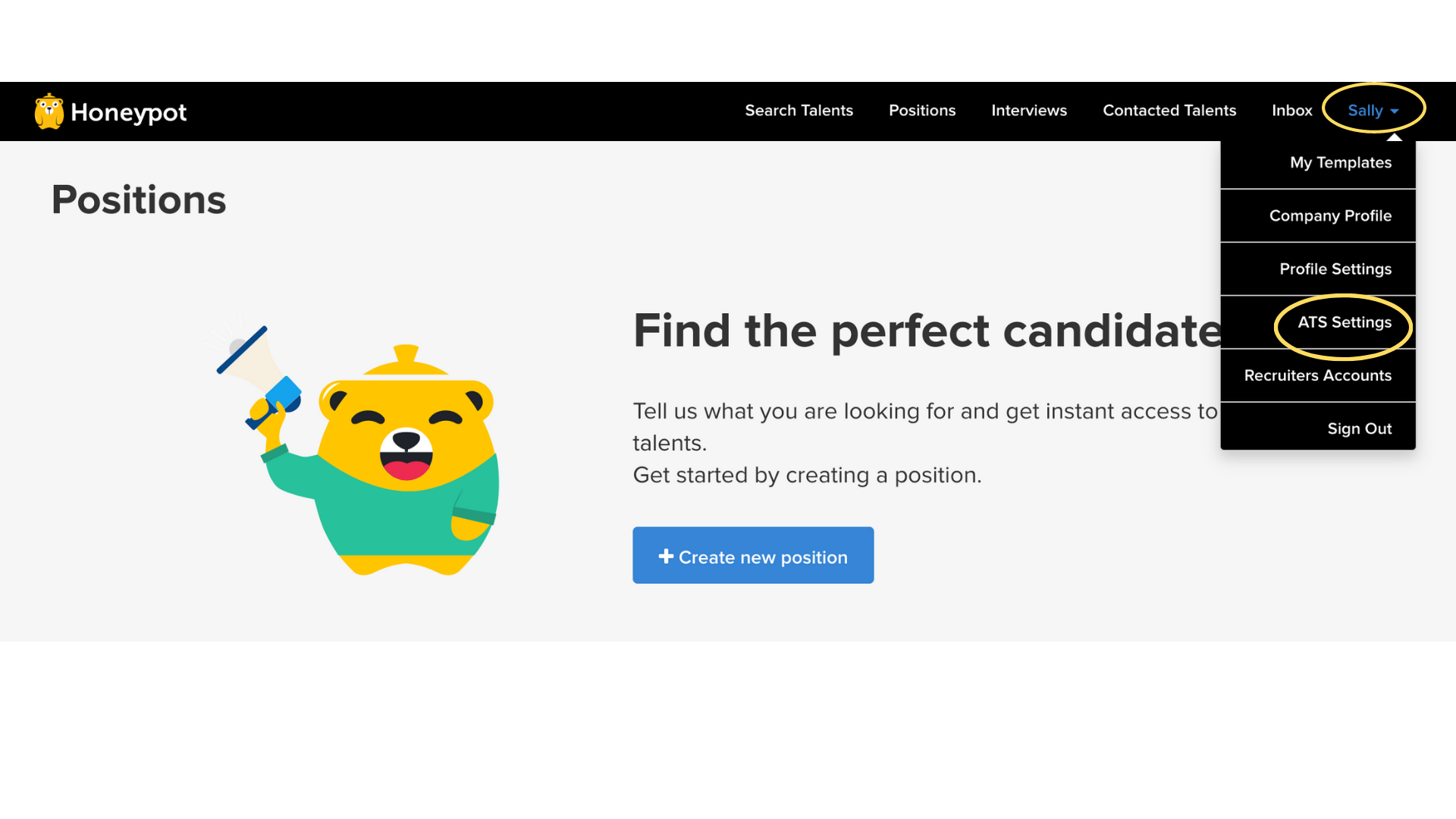
2.) Select ‘ATS Settings’ from the dropdown menu. This will redirect you to a new page with all Honeypot ATS connection options.

3.) Navigate to the ‘Personio’ section and click the associated button labelled ‘Connect’.
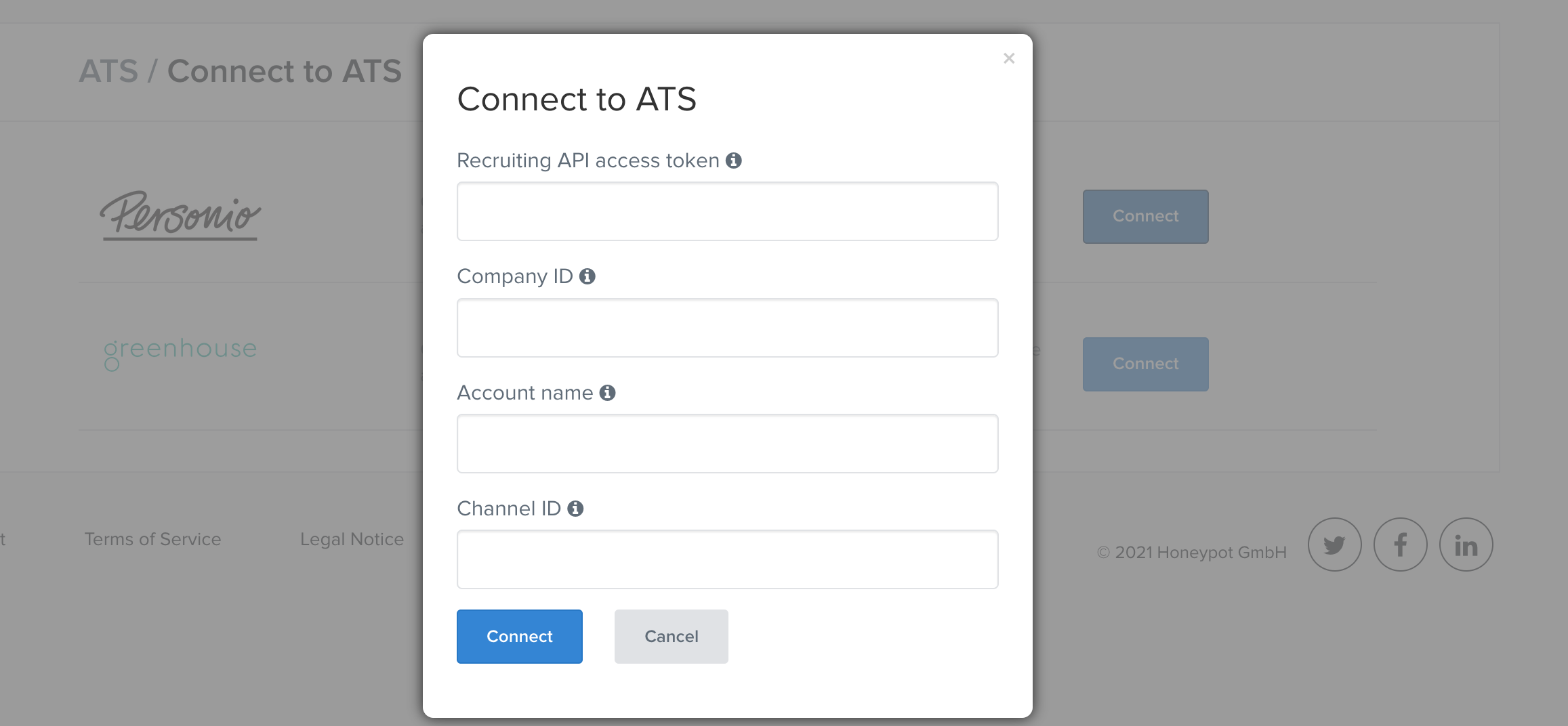
4.) Enter the account details requested in the pop up. These are related to your Personio account and can be found on the Personio platform. Once this information is entered, click ‘Connect’, and you’re done!
If you need help locating this data on Personio, continue to the walkthrough below.
How to locate required Personio account details
To find the relevant Personio account details, log into the Personio platform using the account you would like to connect. Next, there are four specific pieces of information to copy and paste.
1.) API Access Token
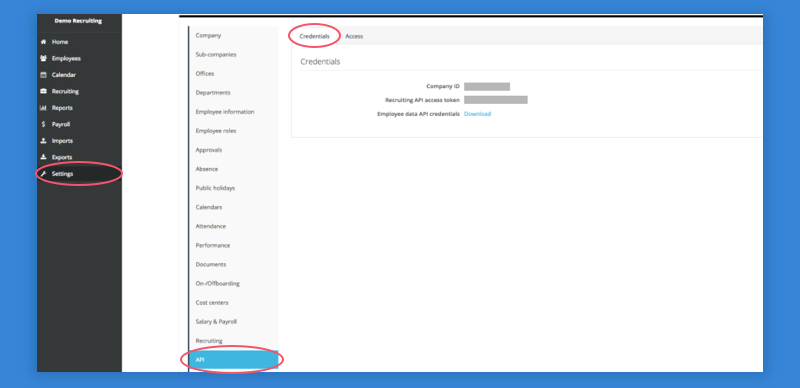
Click ‘Settings’ on the left navigation menu and then ‘API’. This will reveal the account’s API credentials. Copy the supplied token next to ‘Recruiting API access token’ and paste it into the form on the Honeypot platform, next to the text ‘Recruiting API access token’.

2.) Company ID
If you have not already done so, click ‘Settings’ on the left hand navigation menu and then ‘API’ (as you did in the previous step). Copy the supplied token next to ‘Company ID’ and paste it into the form on the Honeypot platform, next to the text ‘Company ID’.
3.) Account Name
Locate the URL bar in your browser. The text before ‘.personio’ is your company’s account name. For example, if the URL is https://mycompany.personio.de/, the account name is ‘mycompany’. While using the Personio platform, copy the text between ‘https://’ and ‘.personio’ and paste it into the Honeypot platform, next to the text ‘Account name’.
4.) Channel ID
Click ‘Settings’ on the left hand navigation menu and then ‘Recruiting. This will reveal several options related to your account. For reference, the URL might look like this: https://mycompany.personio.de/configuration/recruiting/channels
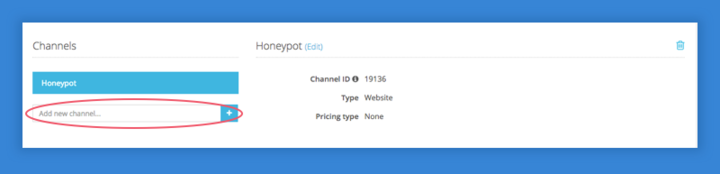
Select ‘Channels’ from the top navigation menu. If someone in your organisation has already created a channel for Honeypot, this will appear as an option. Simply click the channel name and then copy the supplied Channel ID. Paste this number into the form on the Honeypot platform, next to the text ‘Channel ID’. If your Channels list does not yet include an option for Honeypot, you will need to create this channel. Select the option ‘Add new channel…’ and follow the steps. Once this is completed, click on the newly created channel and then copy the supplied Channel ID. Paste this number into the form on the Honeypot platform, next to the text ‘Channel ID’
5.) Enable XML Feed
Make sure you have enabled the XML feed on Person.io:
- Navigate to Settings > Recruiting > Recruiting.
- In the tab Career page, go to Activations.
- Activate the checkbox Enable XML feed.
- Then click Apply changes in the bottom-right corner.
6.) Connect
Once all the fields have been filled in, click on the “Connect” button and you’re done!